Table of Contents
Limiting a Search Using Phone and Call Criteria
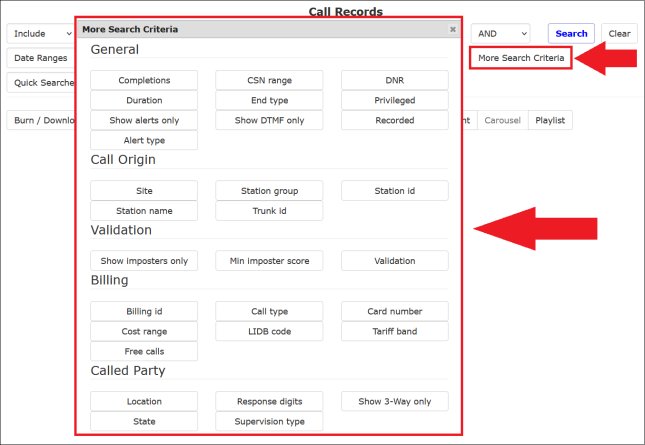
After you click More Search Criteria, a dialog box is displayed, letting you specify several additional search criteria related to the origin of the calls and specific information about the calls. These criteria are grouped into categories, as shown in the following example.
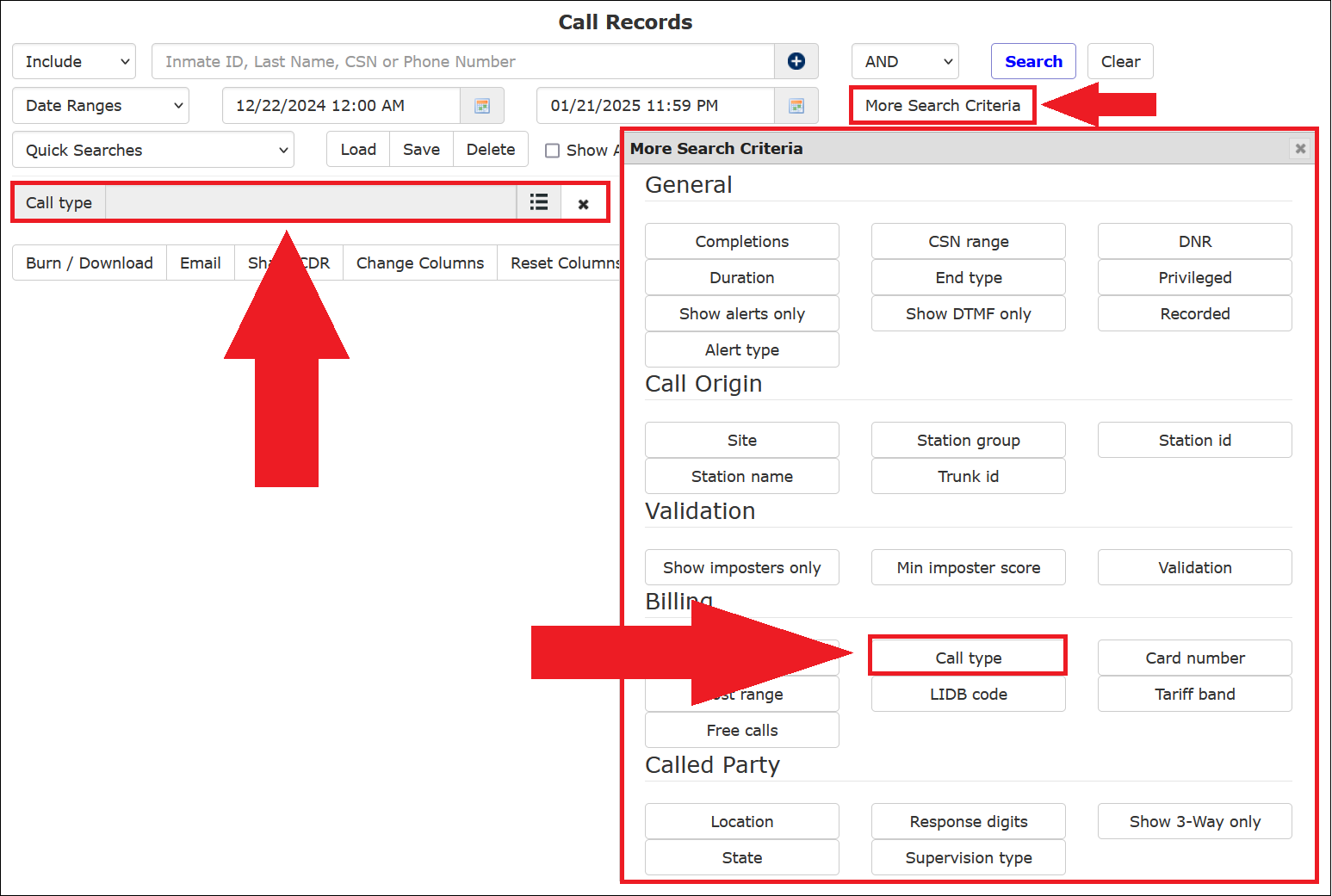
Each time you click on an additional criterion, a dialog box for that criterion is added to the Call Records search page, and the More Search Criteria box closes. In the following example, the user selected Call Type. Afterward, the More Search Criteria box closed, and a dialog box was added to the display to enable the selection of one or more call types.
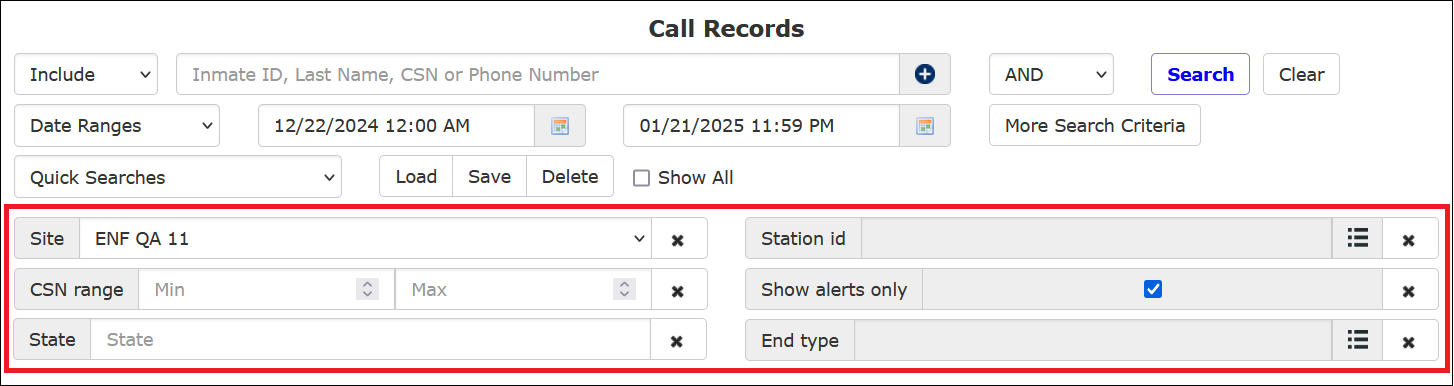
The following example shows the user has selected six additional search criteria. As a result, six dialog boxes are displayed where the user specifies one or more selections, makes a text entry, identifies a range for the criterion, or clicks an activation checkbox.
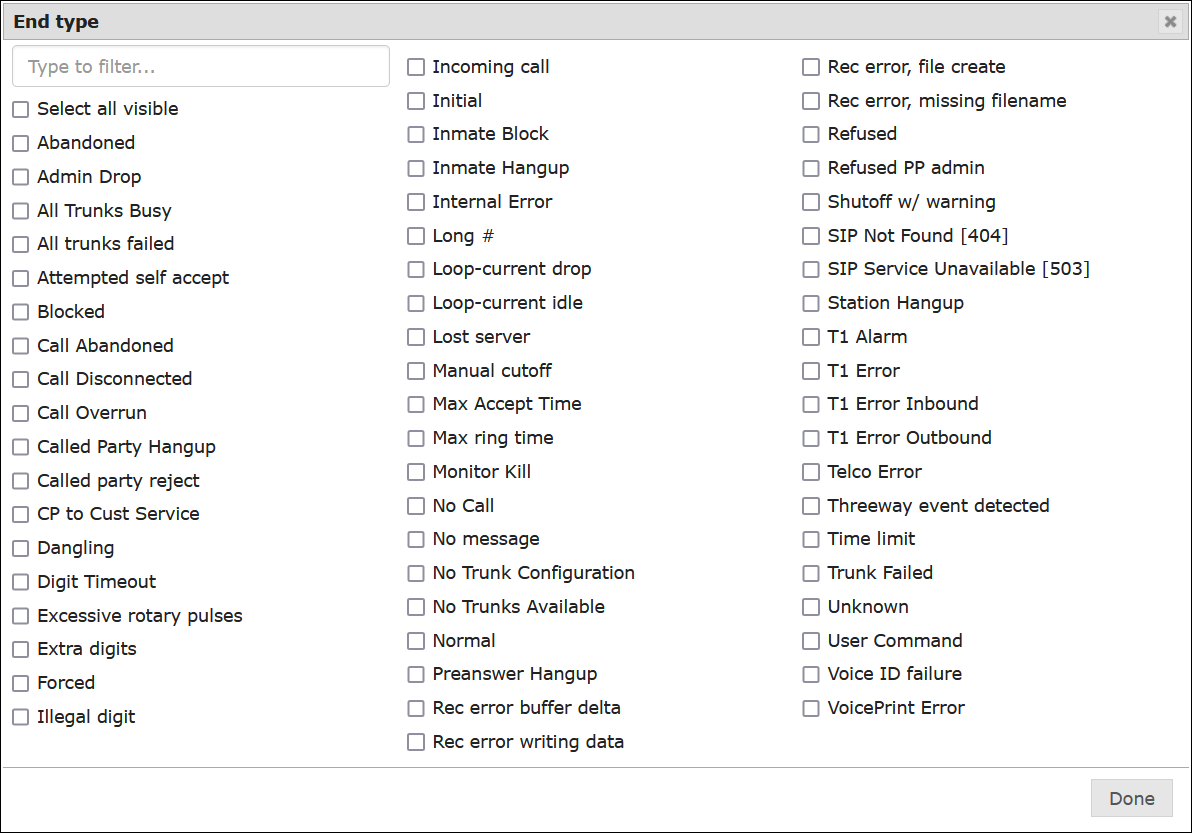
If the selected criterion enables multiple selections, click  to view the list. You can select one or more items from the list.

If the selected criterion allows you to make only one selection, click  to view a dropdown list from which you can select only one option.

If the selected criterion requires entering a numeric range, enter it in the blank fields or use  .
.

If the selected criterion requires simple activation, click on the checkbox highlighted below to activate it.

If the selected criterion displays a text entry field, type in the requested information in the field.

Table: Call Records Search – More Search Criteria Option Descriptions
The following table details the options in the More Search Criteria box.
| Option | How it Limits a Search |
|---|---|
| Site | If facility has multiple sites, limits search to calls placed from a specific site, or from all sites. |
| Completions | Limits search based on completion status of calls selected from a dropdown list. |
| CSN Range | Limits search to call records with a number between the specified Min and Max values. |
| DNR | This limits the search only to calls that were not recorded (called numbers flagged as Do Not Record (DNR) in the Global Numbers library), calls that were recorded, or All. |
| Duration | Limits search to calls with a time duration in seconds between the specified Min and Max values. Values can be entered as a plain number of seconds, such as 60, or in mm.ss format, such as 1:25. |
| End Type | Limits search only to calls that ended due one or more End Types (reason why call ended) selected from a checkbox list. |
| Privileged | Limits search to privileged, non-privileged calls, or both. |
| Show Alerts only | Limits search to placed calls that have alerts activated, either for the inmate or the called party number only (by clicking the checkbox). |
| Show DTMF only | Limits search to calls that had extra DTMF digits pressed after the call has been accepted and is in progress. |
| Recorded | Limits search to calls for which a recording is available, not available, or both. |
| Show PREA only | Limits search to calls placed by inmates to a number defined as PREA (sexual abuse incident reporting in The Informer Admin℠ function or in The Communicator Admin℠ function. |
| Show high-profile only | Limits search to calls placed to inmates designated with the high-profile setting. For more information, see article. |
| Alert Type | Limits search to calls that triggered one or more specific types of alerts based on where the alert was defined. For example, inmate, global number, payment, voice verification. |
| Site | Limits search to specific Site selected from a dropdown list. |
| Station Group | Limits search to specific Station Group selected from a dropdown list. |
| Station ID | Limits search to one or more Station IDs selected from a checkbox list. |
| Station Name | Limits search to one or more phone stations by selecting one or more stations from a checkbox list. |
| Trunk ID | Limits search to specific Trunk ID entered in text field. |
| Show Imposters only | Limits search to only calls where a suspected imposter was detected by The Imposter℠ voice detection and analysis module. |
| Min Imposter score | Limits search to only suspected imposter calls that scored above a minimum probability threshold (percentage) that an imposter is present on the call. |
| Validation | This search option is used by ICS Technical Support only. Validation codes are used in conjunction with call billing and instructions on how the call is handled based on billing or global number parameters. |
| Billing ID | Limits search to specific Billing ID entered in the text field. |
| Call Type | Limits search to one or more selected Call Types selected from a checkbox list. |
| Card Number | Limits search to calls placed using a specific Debit Card (card number entered in text field). |
| Cost Range | Limits search to calls with a cost (in dollars) between the specified Min and Max amounts. |
| LIDB Code | This search option is used by ICS Technical Support only. |
| Tariff Band | Limits search to one or more selected call Tariff Bands. |
| Free Calls | Limits search to one or more reasons why an inmate call was free (not charged to inmate) selected from a checkbox list. |
| Location | Limits search to calls placed by an inmate to a specific city. Enter the name of the city (10 characters maximum). |
| Response Digits | Limits search to calls where called party entered a specific response digit (digit entered in text field). |
| Show 3-Way only | Limits search to three-way calls only (by clicking the checkbox). |
| State | Limits search to calls placed to called parties within a specified state. Enter the two-character postal state code. |
| Supervision Type | This search option is used by ICS Technical Support only. |
Table: Call Records Search – End Type Descriptions
| End Type | Description |
|---|---|
| Abandoned | Not used |
| Admin drop | Admin setup call to Customer Service was offered to called party, but called party hung up. |
| All trunks failed | All trunks failed after attempting to handle the outbound call. |
| All trunks busy | No trunk is available to handle the outbound call. |
| Attempted self-accept | Inmate pressed the accept call digit. |
| Blocked | Called party number has been blocked for all inmates in the Number Detail Record in the Global Numbers library. |
| Call Abandoned | Inmate hung up the call before the maximum allotted time and before the called party hung up. No end-of-call event was logged. |
| Called Party Hangup | Inmate call to an outside party ended by the called party hanging up first. |
| Called party reject | Not used |
| Call overrun | Actual call duration exceeded the maximum defined time threshold for the call. |
| CP to Cust Service | Called party was transferred to ICS Call Center agent. |
| Digit timeout | Inmate did not enter the 10-digit number within the allowed time to complete dialing. |
| Excessive rotary pulses | Not used |
| Extra digits | Extra digits were dialed after the call was accepted and was in progress, which normally indicates a third-party call attempt. |
| Forced | Call was terminated by the carrier (telephone company) of the called party. |
| Illegal digit | The inmate pressed a digit that is not valid in the IVR per active ENFORCER® functions and did not enter a valid digit after being prompted a second time. |
| Incoming call | Not used by facility users. Call was placed to the IVR by an outside caller (includes calls from ICS Technical Support, calls placed to an Inmate Voice Mailbox by a Prepaid Collect account holder, and calls placed by an investigator in response to a Monitor or Pager Alert). |
| Initial | Not used |
| Inmate Block | Called party number has been blocked on the inmate’s PAN (Personal Allowed Numbers) list. |
| Inmate hangup | Inmate call to an outside party ended by the inmate hanging up first. |
| Long # | Call was terminated with a long sharp (inmate pressed ‘#’ key for at least two seconds instead of pressing the hookswitch). |
| Loop-current drop | Not used |
| Loop-current idle | Not used |
| Lost server | ENFORCER® platform was disabled during call. |
| Manual cutoff | Call was disconnected in a manner other than through The Observer℠ live call monitoring module. Disconnection was made by an Investigator through the IVR, or by an authorized ENFORCER® user. |
| Max accept time | Called party did not press the accept call digit before the maximum time threshold expired. |
| Max ring time | Ring time exceeded maximum ring time threshold set up in The ENFORCER® configuration. |
| Monitor kill | Call was disconnected through The Observer℠ live call monitoring module. |
| No call | Station was taken off-hook, but no call was made. |
| No message | Not used |
| Normal | Called party and inmate both hung up after call reached its timed duration. |
| No trunks available | No trunk was available to complete the call. |
| Preanswer Hangup | Inmate successfully dialed the called party, but hung up before the called party answered. |
| Refused | Called party refused to accept the call. |
| Refused PP admin | Called party refused to accept a Prepaid Collect call. |
| Shutoff w/ warning | Call was disconnected after the caller was provided with the prerecorded allowed time remaining warning, and the call was still in progress after the minute had expired. |
| Station hangup | Inmate hung up before the call was connected to the called party. |
| Telco Error | The call did not connect to the carrier. This occurs when the number the inmate called is no longer in service. |
| Threeway event detected | Call was disconnected because The ENFORCER® detected a three-way call attempt. |
| Time limit | Call exceeded allowed time limit and was disconnected by system without the called party or the inmate hanging up. |
| Trunk failed | Call was in progress, but was disconnected due to a trunk failure. |
| T1 Error Inbound | Not used |
| T1 Error Outbound | Not used |
| Unknown | Not used |
| User command | Not used |
| Voice ID failure | The call was disconnected because the inmate’s voice did not match the voiceprint that was originally recorded by the inmate. This type of call disconnection occurs only if Inmate Voice Verification (The Verifier℠) is used at the facility. |
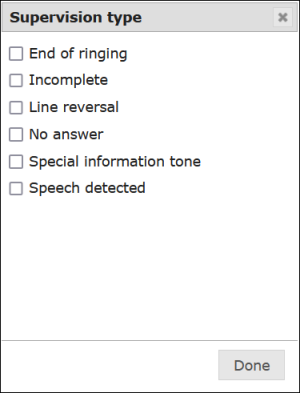
Table: Call Records Search – Supervision Type Descriptions
| Supervision Type | Description |
|---|---|
| End of ringing | The Inmate hung up the call before the maximum allotted time and before the called party hung up. |
| Incomplete | Not used |
| Line reversal | Not used |
| No answer | The called party did not answer the phone. |
| Special information tone | The dialed number is not a working or existing number. This tone is returned from the carrier of the called party when a number is dialed incorrectly. This tone can also indicate that the call has been input as a 7-digit number rather than a 10-digit number or a 10-digit number rather than a 7-digit number. |
| Speech detected | The IVR detected speech by the called party. |
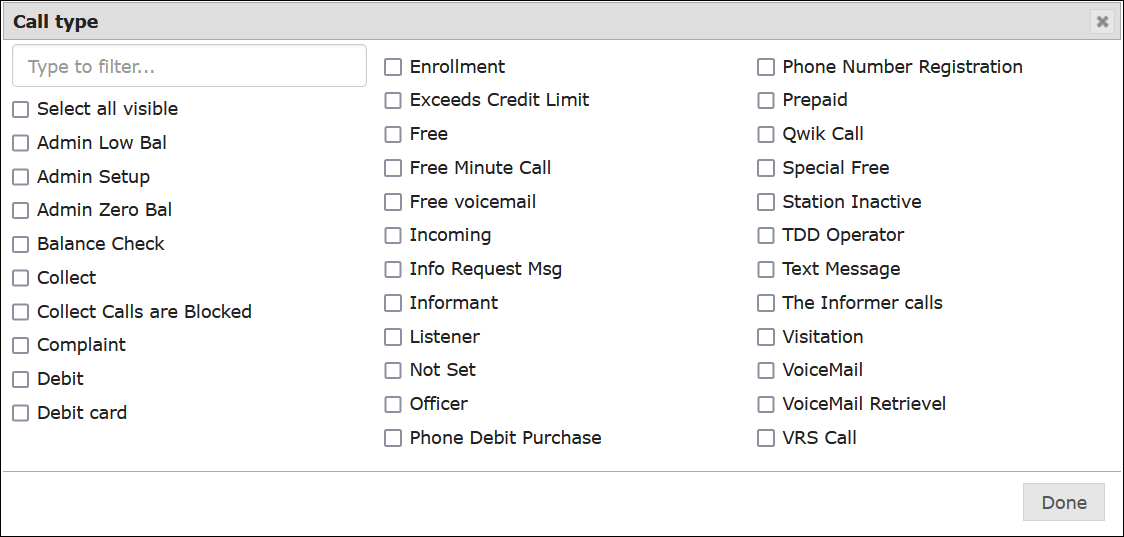
Table: Call Records Search – Call Type Descriptions
| Call Type | Description |
|---|---|
| Admin Low Bal | Inmate calls that were attempted to a Prepaid Collect number but were not completed due to an insufficient balance in the Prepaid Collect account. |
| Admin Setup | Inmate calls were attempted to a number that cannot receive collect calls, and the called party accepted a prerecorded invitation to be transferred to the Call Center to set up a Prepaid Collect account. |
| Admin Zero Bal | Inmate calls that were attempted to a Prepaid Collect number but were not completed due to a zero balance in the Prepaid Collect account. |
| Attorney Registration | Inmate calls placed to the IVR to request the registration of an attorney phone number in The ENFORCER®. |
| Balance Check | Inmate calls placed to the IVR to request the balance in an inmate debit account. |
| Bypass Call | Not used |
| Collect | Inmate calls placed to called parties who accepted the call as collect and paid for the calls through their local telephone company. |
| Collect Calls are Blocked | Inmate attempted a collect call to a number that is blocked from receiving collect calls. |
| Commissary | Inmate calls placed to the IVR to place a Commissary product order (if the facility is using the ICS Commissary or Commissary ordering function). |
| Complaint | Calls placed to the IVR by an inmate to an Inmate Complaint line (optional ENFORCER® feature). |
| Debit | Inmate calls that were charged to an inmate debit account. |
| Debit Card | Inmate calls that were charged to an inmate debit card account. |
| Direct | Inmate call that was placed to called party with a Direct Bill Collect account. |
| Direct Admin | Admin calls (1-minute complimentary calls) that were provided for called parties who do not have billing arrangements through their local phone company. |
| Direct Admin Zero Bal | Not used |
| Direct No Bill | Not used |
| Enrollment | Calls placed to the IVR for inmate enrollment. |
| Exceeds Credit Limit | Collect calls that exceeded the credit threshold established for the called party number. |
| Free | Calls that are defined by the facility as being free (placed at no cost) to all inmates. |
| Free Voicemail | Free (no cost) voice mail message left for inmate by outside caller. |
| Incoming | Call was placed to the IVR by an outside caller (includes calls from ICS Technical Support, and calls placed by an investigator in response to a Monitor or Pager Alert). |
| Incoming Message | Call placed by a Prepaid Collect account holder (friend or family) to leave a voice mail message for an inmate. |
| Informant | Calls that were made using The Informer℠ IVR (confidential, anonymous inmate informant call). |
| Listener | A call placed by a third-party investigator to barge in to an inmate call in progress. |
| Lobby | Calls placed from a phone defined in The ENFORCER® Station Table as a Lobby phone (phone installed outside of inmate incarceration area in facility). |
| Medical Menu | Not used |
| Not Set | Call was terminated before the IVR collected sufficient data to assign a call type. |
| Officer | Call placed by an officer from a station within the facility who is using the Security Officer Check-In feature to verify that security rounds have been made. |
| Phone Number Registration | Call placed by an inmate to request the registration (addition) of a personal allowed number (PAN) to their calling list. |
| Phone Debit Purchase | Call placed by an inmate to request transfer of funds from their Commissary account to their Inmate Debit account. |
| PREA | Call placed by an inmate to an external sexual abuse reporting hotline, to a law enforcement agency, or to a designated administrative resource at the facility for immediate attention and response. This type of call is defined by a site administrator using either The Informer℠ Admin function or The Communicator℠ Admin function. |
| Prepaid | Inmate calls which were placed to called parties who have a Prepaid Collect account set up with a sufficient current balance to pay for the call. |
| Snitch | Informant calls placed by an inmate through The ENFORCER® IVR. |
| Special Free | Calls which are otherwise charged to an inmate or called party, but are free (not billed) per the Free Calls Allowed setting on the Inmate Detail page. |
| TDD Operator | All calls placed to a TDD operator using a TDD device. TDD stands for Telecommunications Device for the Deaf. |
| Text Message | Not used |
| The Informer calls | Calls placed by an inmate to The Informer℠ module (anonymous incident reporting). |
| Visitation | Calls placed from a visitation phone to an inmate. |
| Voice Mail Retrieval | Call placed by an inmate to listen to a voice message left by a friend or family member (Prepaid Collect account holder). |
| VRS Call | Video Relay Service call (hearing impaired inmate). |
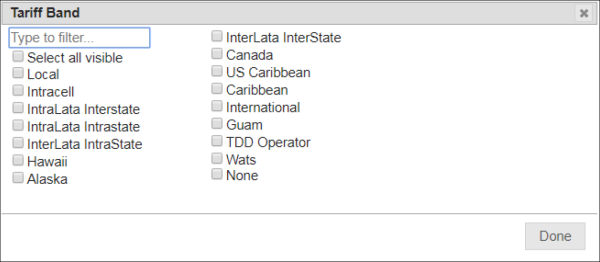
Table: Call Records Search – Tariff Band Descriptions
| Tariff Type | Description |
|---|---|
| Alaska | Call placed to called party in Alaska. |
| Canada | Call placed to called party in Canada. |
| Caribbean | Call placed to called party in the non-US Caribbean Islands. |
| Guam | Call placed to called party in Guam. |
| Hawaii | Call placed to called party in Hawaii. |
| InterLata Interstate | Call placed to a number in a different LATA (Local Area Telephone Access) region in a different state. |
| InterLata Intrastate | Call placed to a number in a different LATA (Local Area Telephone Access) region within the same state. |
| International | Call placed to called party outside the US. |
| Intracell | Call placed to a local cell phone. |
| IntraLata Interstate | Call placed to a number within the same LATA (Local Area Telephone Access) region, but to another state (LATA crosses a state boundary). |
| IntraLata Intrastate | Call placed to a number within the same LATA (Local Area Telephone Access) region within the same state. |
| Local | Local call |
| None | Call was not billable. |
| TDD Operator | All calls placed through a TDD to a TDD operator. “TDD” stands for Telecommunications Device for the Deaf. |
| US Caribbean | Call placed to called party in the US Caribbean Islands. |
| Wats | Call placed to a long distance called party number that is set up on a WATS (Wide Area Telephone System) connection, such as 1-800, 1-866, and 1-888 numbers. Inmate calls to WATS numbers are not allowed unless the number is defined in The ENFORCER® Global Numbers library. |
How to perform a Call Records search using phone-specific or call data-specific criteria
- Go to Call Detail > Call Records. The Call Records search page is displayed.

- Specify any inmate, phone number, CSN, and date range parameters you want in the same manner as a basic Call Records search.
- Click More Search Criteria. You can specify as few or as many criteria as you want to limit the search.
- Select or specify options or values for each additional criterion you selected.
If you make new selections in the More Search Criteria dialog box and then click Close, any selections you made will be saved and displayed the next time you open it during your current browsing session. If you log off, however, your selections will be cleared.
- Click Search. The call records you requested are displayed in the bottom half of the page.
- If you want to cancel your entered criteria and start over, click Clear.