Table of Contents
Inmate Accounts
Overview
When an inmate makes a pay-per-call phone call using The ENFORCER®, the inmate is required to select a payment method for the call prior to placing the call. The ENFORCER® is configured to prompt the user to identify the type of call and to provide the information necessary to correctly bill the call.
Unless the inmate call is free, each call is billed per a corresponding account type. Currently, four account types are available in The ENFORCER®. Two account types enable inmates to pay for calls; two account types enable called parties to pay for calls.
- Inmate Debit: Account funded by the inmate or for the inmate.
- Inmate Debit Card: Purchased calling cards. These are used at some facilities instead of Inmate Debit.
- Standard Collect: Billed to the called party by the local phone company.
- Prepaid Collect: Billed to the called party at the time the call is placed.
Account Types
The four main account types currently available in The ENFORCER® are summarized in this section.
Inmate Debit
Inmate Debit Accounts enable payers to deposit funds into an inmate’s account. These funds are then used to pay for outbound phone calls to any called party number that is approved by the agency for that inmate. This account can be funded by the inmate, who may receive pay for work performed while incarcerated. This account can also be funded by family members or friends outside the facility who make payments through a funding account.
Currently, these payments can be made through ICSolutions® Customer Service or through the ICSolutions® website. At some facilities, the account may be funded through transfers from a third-party commissary trust account.
Inmate Debit Card
Inmate Debit Card accounts use pre-purchased debit cards to pay for outbound phone calls to any called party number approved by the facility for that inmate. Debit cards are purchased from the facility commissary through separate commissary purchasing accounts established for each inmate. Each debit card has a card PIN printed on the face of the card, which must be entered by the inmate before a call is placed. The call is then billed against the face value of the card until the balance is exhausted. Inmate debit cards are usually sold in a cash value increment such as $20. The inmate can purchase multiple cards and transfer balances between cards using The ENFORCER® IVR.
The following points summarize the use of inmate debit cards:
- A new debit card must be activated by the inmate through The ENFORCER® prior to its use.
- After a debit card has been activated, the inmate must enter the card PIN each time it is used in The ENFORCER® IVR to place a call. After initial activation, The ENFORCER® IVR will skip the activation step when the inmate uses the card.
- An inmate can purchase more than one debit card and can use any card that has an adequate balance to pay for a call.
- For convenience, an inmate can also transfer the entire balance of a new card to an existing card. The inmate must complete an additional task through The ENFORCER® IVR to complete a funds transfer. This feature prevents the inmate from having to memorize a new card PIN and prevents the inmate from having to physically carry the card to the phone station.
- After a debit card is used to pay for a call and part of the balance has been used, the remaining funds cannot be transferred to another card.
Most facilities use only one type of debit account for inmate-funded calls, either Debit or Debit Card, but not both.
Collect
Collect accounts are set up in the traditional manner where charges for calls are billed directly to the called party by a local telephone company or carrier. Therefore, a customer’s monetary balance is not accessible in The ENFORCER®. However, a record of this account is maintained in The ENFORCER® and certain validation and maintenance tasks can be performed for a Collect account.
Although The ENFORCER® does not track and bill charges for collect calls, the agency using The ENFORCER® is essentially lending the call costs, for which the carrier must reimburse the correctional facility after the account holder has paid them. For managing potential fraud and bad debt on collect calls, monetary usage thresholds are defined by default in The ENFORCER®. These threshold amounts are defined per day, per week, and per month. In turn, carriers comply with these thresholds and disallow further Collect calls during the period when a threshold is reached.
Prepaid Collect
Prepaid Collect accounts are the account type established using ICSolutions® Point-of-Sale Prepaid Collect℠ product. This account type enables any called party to set up a pre-funded account for a billing telephone number (BTN). This type of account is ideal for enabling collect calls to a number that would otherwise be blocked. For Example, a cell phone number or phone customer with credit problems or billing arrangement issues. A Prepaid Collect account enables one or more payers to deposit funds into the account.
A Prepaid Collect account can be created through a direct phone conversation between the called party and the ICSolutions® Customer Service Center at 1-888-506-8407. Also, a Prepaid Collect account can be created by accessing the ICSolutions® website. Funds can be deposited into a Prepaid Collect account through several available payment methods.
When an inmate first attempts a collect call to a number that cannot receive a collect call, The ENFORCER® IVR automatically allows a one-time, 60-second complimentary call to the called party. To promote the establishment of a Prepaid Collect account, an ENFORCER® voice prompt offers the called party the opportunity to set up an account immediately following the complimentary call. At the end of the call, The ENFORCER® offers the called party the option to be automatically connected to the ICSolutions® Customer Service Center. This call is referred to as an Admin Setup Call. If the called party accepts the offer to place the admin setup call, a Prepaid Collect account can be established over the phone to enable future calls as long as an adequate balance is maintained in the account.
Calling Account Funding Sources
Depending on the account type, The ENFORCER® can receive funding from different sources. Generally, these sources dictate The ENFORCER® tasks that can be performed by a user on an account. The following table summarizes the funding methods and user capabilities for the four ENFORCER® account types.
Table: Calling Account Funding Sources
| ENFORCER® Account Type | How Account Can Be Funded | ENFORCER® User Capabilities |
|---|---|---|
| Inmate Debit | • ICSolutions® Customer Service (live Agent) • ICSolutions® web site • Interface with facility Commissary application • Interface with facility Jail Management System (JMS) or Records Management system | • Make manual account balance adjustments • Create a separate Inmate Debit account that can be funded only through The ENFORCER® client, and that can be used to pay for calls to one called party only |
| Inmate Debit Card | • Facility Commissary application (debit cards purchased directly from the commissary or facility by the inmate) | • Make manual account balance adjustments • Transfer existing balance from one card to another |
| Prepaid Collect | • ICSolutions® Customer Service (live Agent) • ICSolutions® web site • ICSolutions® direct phone number | • Make manual account balance adjustments • Create a new Prepaid Collect account • Convert Prepaid Collect account to a Collect account |
| Collect | N/A – account relationship is between the called party and local phone carrier | • Override default calling thresholds set by ICSolutions® • Query the global Line Information Database (LIDB) to ensure the validity of number for the establishment or continuation of a collect account • Convert Collect account to Prepaid Collect account |
When you click the Accounts tab on The ENFORCER® main menu, four of the displayed menu items correspond to the four main account types that are used to pay for inmate calls. The remainder of this chapter describes how you can perform the tasks shown in the right-hand column of the above table for each account type.
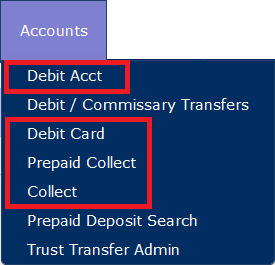
The Debit / Commissary Transfers and Prepaid Deposit Search menu items represent specialized functions that may be activated for your agency. These functions are also covered in this chapter.
View/Edit Permissions for Accounts
The functions discussed in this chapter are limited to selected users at the facility who work in the accounting department, and who may be authorized to make balance adjustments to accounts.
For each of the four account types, view-only access can be set up for a user at the facility. In most cases, view-only access is limited to The ENFORCER® Site Administrator at your facility. In some cases, however, view-only access may be granted to a lower-level user on a per-account type basis. Additionally, The ENFORCER® Site Administrator may be set up to perform account balance adjustments as well as other specialty tasks discussed in this chapter.
When an ENFORCER® client installation is based on a relationship with business partners of ICSolutions®, these installations may receive account funding through sources not discussed in this chapter. As a result, these installations require restricted special access for The ENFORCER® Site Administrator for creating and adjusting accounts.