Collect Accounts
You can access Collect Accounts by selecting Collect under the Accounts tab.
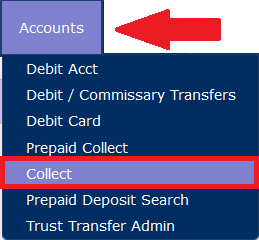
When you access an existing Collect account, The ENFORCER® displays the following page.
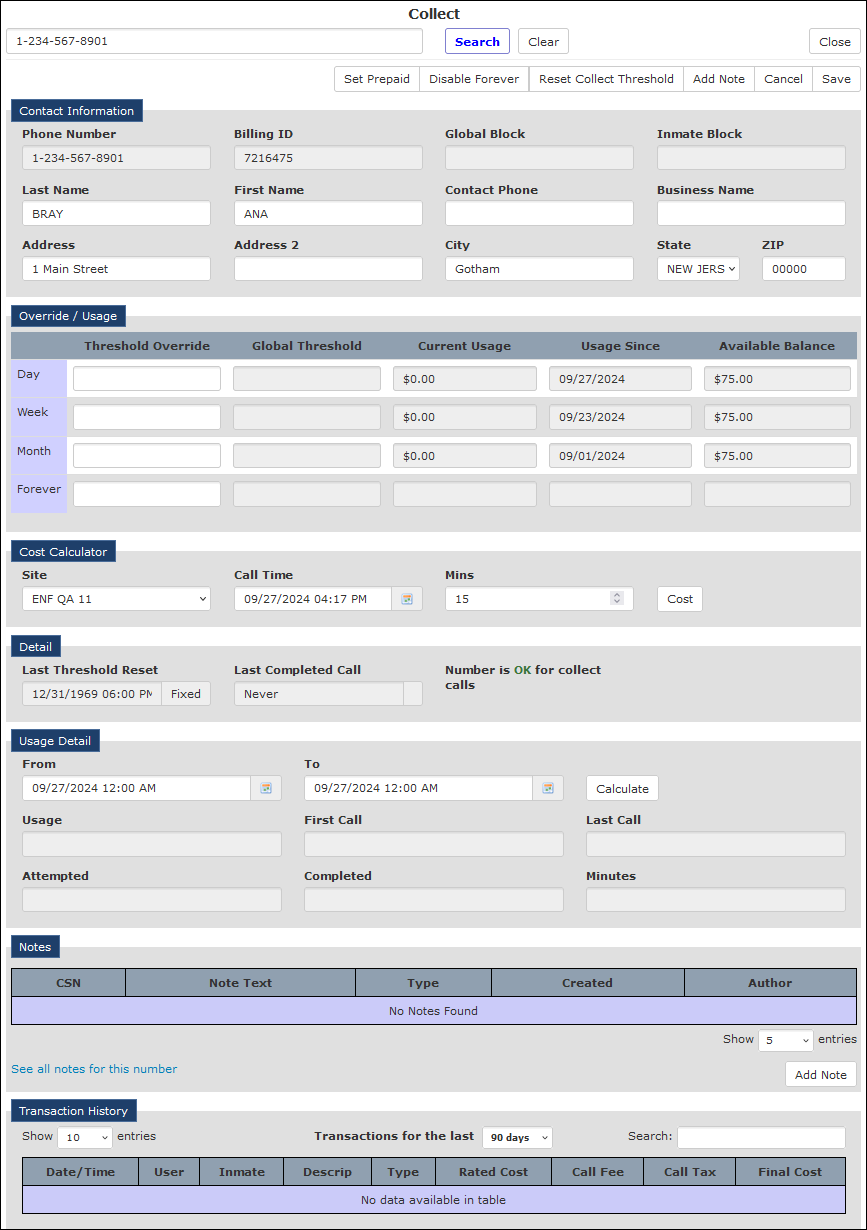
The Collectpage lets you view up-to-date account usage for an existing Collect account. Additionally, you can perform other tasks for the account, as described below.
How to view and edit a Collect account
- Enter the 10-digit phone number in the Phone Number field. Click Search. The account record will be displayed.
- To perform a check against the Line Information Database (LIDB) to determine if the number is currently eligible to receive collect calls, click Do LIDB in the Detail pane.
The current LIDB status is displayed to the left of the Do LIDB button. This information is held in a cache for 24 hours. If the cache has not yet expired since the last LIDB check, then you do not need to perform it again.
- To reset the collect threshold to the current time, click Reset Collect Threshold at the top of the page.
- To switch the collect account from a standard Collect account to a Prepaid Collect account, click Set Prepaid at the top of the page.
- To disable the Collect account, click Disable Forever at the top of the page.
- You can view the call records for collect calls shown in the Transaction History pane in the same manner as for an Inmate Debit Account. For information about viewing Call Records from a Debit Account, click here.