Setting Alerts for a Number
You can define any of four alerts triggering when an inmate calls the number defined in the Number Detail Record. Three of the alert types can be defined by clicking Edit Alerts in the Alerts pane and then adding an email address or 10-digit phone number for the desired alert type in the Edit Alerts dialog box as shown in the following example.
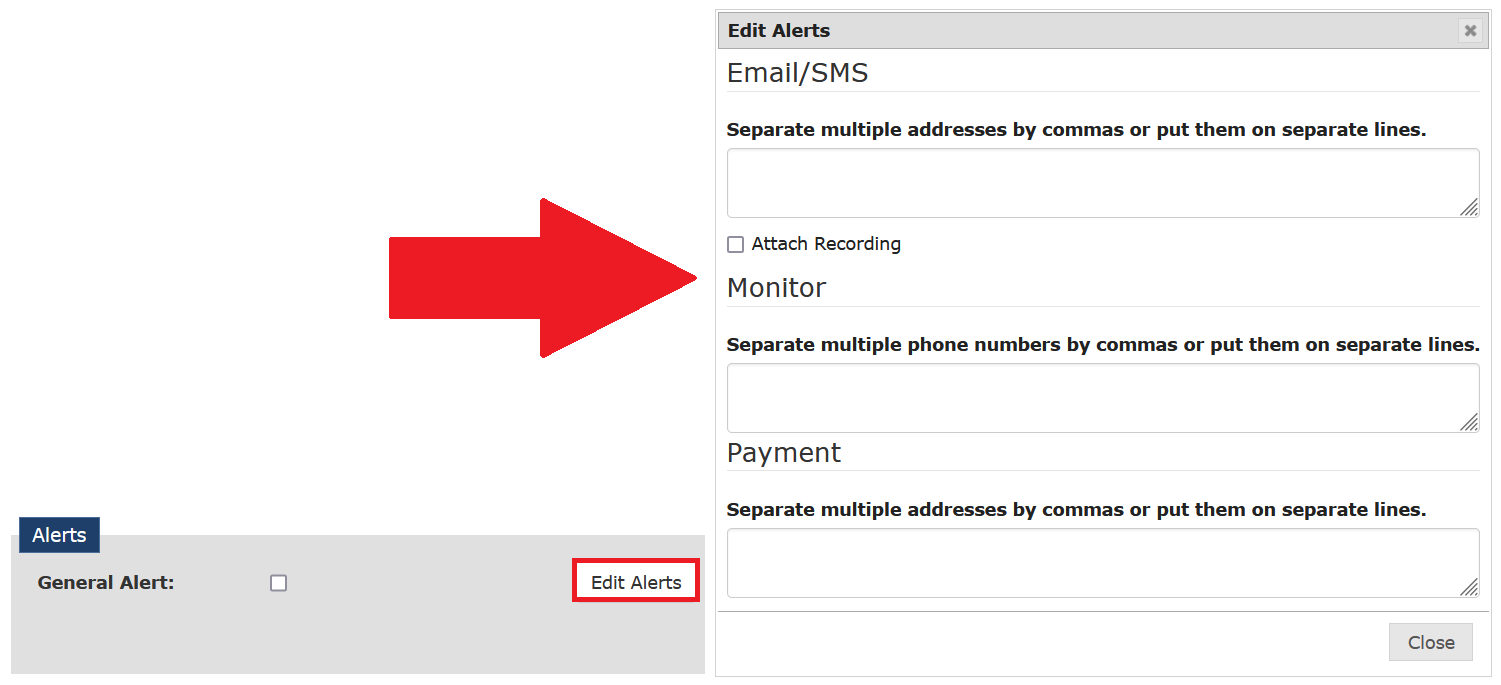
The three alerts in the Edit Alerts dialog box are triggered when the called party accepts the call. These alerts are set system-wide and are in addition to any inmate alerts that may be set on the Inmate Detail page for a specific inmate.
The following example shows entered phone numbers and email addresses, which define recipients for the respective alert type. Additionally, the Email/SMS alert type displays a checkbox that enables you to attach the call recording that triggered the alert to the alert email message.

After you define recipients for one or more alert types, this information is displayed in the Alerts pane, as shown in the following example.

The three alert types are described in the following table.
Table: Global Numbers Alert Type Descriptions
| Option | Description |
|---|---|
| Email/SMS | • After you enter one or more email addresses, The ENFORCER® sends an email message to these addresses when a call is accepted by the called party. An email alert is recommended as a backup contact method when a Monitor alert is set up for the called party number. Use a comma to separate multiple email addresses, or enter each address on a separate line. • After you enter one or more phone numbers, The ENFORCER® sends an SMS text message to these phone numbers when a call is accepted by the called party. Use a comma to separate multiple phone numbers, or enter each phone number on a separate line. You can mix email addresses with phone numbers in the recipients box. |
| Attach Recording (checkbox) | When checked, The ENFORCER® attaches the call recording to the email sent to all defined email addresses under the Email/SMS tab. The call recording is in mp3 format. |
| Monitor | After you enter one or more phone numbers, the numbers are called one at a time, with the first person answering and getting the call. This notification enables a detective or investigator to acknowledge and then monitor the call in progress. Only the first phone number that acknowledges will be able to listen to the call. To be connected to the call, the investigator must enter the last four digits of the phone number he/she received the call from as a passcode. Use a comma to separate multiple phone numbers, or enter each number on a separate line. |
| Payment | After you enter one or more email addresses, The ENFORCER® sends an email message to these addresses whenever a payment is made on a Prepaid Collect account set up for the called party number. Use a comma to separate multiple email addresses, or enter each address on a separate line. |
| General Alert (checkbox) | When checked, this setting displays an alert flag in all call records for calls placed to the number. If a call to the number is still in progress, the alert flag is displayed on the line item for the call in The Observer℠ live call monitoring function. To activate General Alerts, select the General Alert checkbox as shown in the following example.  |